Installing Oracle 11g R2 Express Edition on Ubuntu 14.04 64-bit Virtual Machine

I need Oracle APEX for one of my project. Instead of waiting for the company DBA configure a workspace for me, I decide to install a local copy of Oracle and APEX myself to familar with.This is part one: install Oracle on UBuntu 14.04 64Bit

Environment

Ubuntu 14.04 64Bit virtual machine
Oracle 11g R2 Express Edition (XE)

Requirement:

Please go over every item below to make sure that your system meets these requirements.

1). Oracle 11g R2 Express Edition may require up to 2GB swap space. please use free -m to verify that you have at least 2G swap space. If you do not have enough swap space, like in my case, then do the followings.

Figure 1. verify that you have enough swap space.

#switch to root
sudo su -
#create swap file on /swapfile
dd if=/dev/zero of=/swapfile bs=1024 count=1048576
mkswap /swapfile 
swapon /swapfile
#backup old fstab file and create a new one
cp /etc/fstab /etc/fstab.bak_`date +%N`
echo '/swapfile swap swap defaults 0 0' >> /etc/fstab
#enable all swap devices
swapon -a
#verify the new swap devices
swapon -s
free -m
2). Install alien for converting the downloaded installer from Red Hat format into Ubuntu-specific installer
sudo apt-get install alien libaio1
3). Configure Awk for compatibility
sudo ln -s /usr/bin/awk /bin/awk
4)Create the following folder if needed
sudo mkdir /var/lock/subsys
5). Create a special chkconfig script:
The Red Hat based Oracle 11gR2 XE installer relies on /sbin/chkconfig, which is not available in Ubuntu. This command will create a file /sbin/chkconfig to simulate the chkconfig tool.
sudo vim /sbin/chkconfig
copy and paste the following content into the newly created chkconfig file
#!/bin/bash
# chkconfig simulator for Oracle 11gR2 XE installer 
file=/etc/init.d/oracle-xe
if [[ ! `tail -n1 $file | grep INIT` ]]; then
echo >> $file
echo '### BEGIN INIT INFO' >> $file
echo '# Provides: OracleXE' >> $file
echo '# Required-Start: $remote_fs $syslog' >> $file
echo '# Required-Stop: $remote_fs $syslog' >> $file
echo '# Default-Start: 2 3 4 5' >> $file
echo '# Default-Stop: 0 1 6' >> $file
echo '# Short-Description: Oracle 11g Express Edition' >> $file
echo '### END INIT INFO' >> $file
fi
update-rc.d oracle-xe defaults 80 01
Save the above file and assign the appropriate execute privilege :
sudo chmod 755 /sbin/chkconfig
6). Fix /dev/shm to avoid having "cause ORA-00845: MEMORY_TARGET not supported on this system" error.

sudo rm -rf /dev/shm
sudo mkdir /dev/shm
sudo mount -t tmpfs shmfs -o size=2045m /dev/shm # whatever value showing in your free -m output.

Installation


1). Download Oracle 11gR2 Express Edition installer from Oracle official site. You need an account to be able to download.

2). Unzip and convert the rpm package to deb package
cd /opt/oracle_src
mv ~/Downloads/oracle-xe-11.2.0-1.0.x86_64.rpm.zip .
unzip oracle-xe-11.2.0-1.0.x86_64.rpm.zip
cd Disk1/
#prepare Ubuntu specific package
sudo alien -d -c oracle-xe-11.2.0-1.0.x86_64.rpm 
#it takes a while for the command to complete.
3). Now you are ready to install Oracle 11gR2 XE.
cd /opt/oracle_src/Disk1
sudo dpkg --install oracle-xe_11.2.0-2_amd64.deb
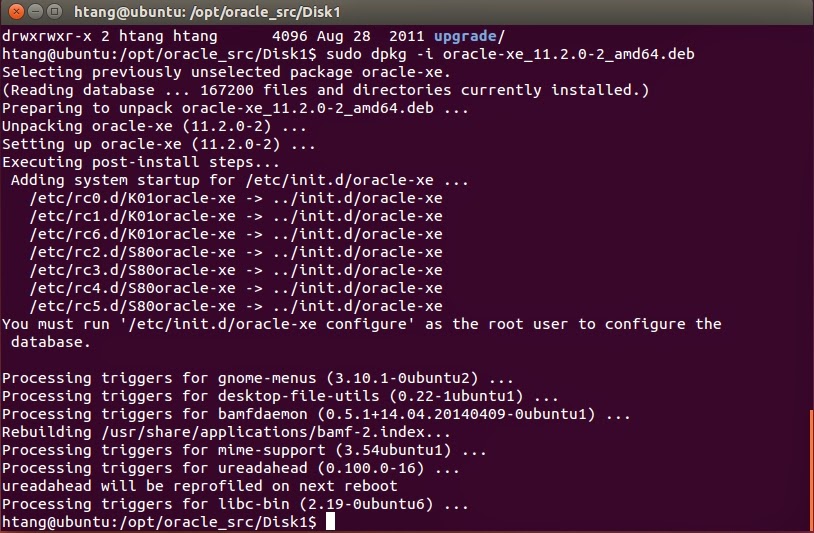
 Fig 2. Output from installing script
4) configure
sudo /etc/init.d/oracle-xe configure
Enter the following configuration information:
HttP port:8080
port used for database listener:1521
password for SYS and SYSTEM:tiger
Do you want Oracle XE to be startted on boot: yes
Congratulations, once you see the following figure.
Fig 3. Success configuration screen

5. Post-installation configuration
5.1 Set-up environmental variables : add the following lines to ~/.bashrc file
vim ~/.bashrc
#copy the following line to file .bashrc
export ORACLE_HOME=/u01/app/oracle/product/11.2.0/xe
export ORACLE_SID=XE
export NLS_LANG=`$ORACLE_HOME/bin/nls_lang.sh`
export ORACLE_BASE=/u01/app/oracle
export LD_LIBRARY_PATH=$ORACLE_HOME/lib:$LFigure 1. verify that you have enough swap space.D_LIBRARY_PATH
export PATH=$ORACLE_HOME/bin:$PATH
5.2 update environment variable
. ~/.bashrc
5.3 try logging into database
sqlplus sys as sysdba [tiger]
6. Use APEX The default APEX installed is Application Express 4.0.2.00.09, which could be reached at http://127.0.0.1:8080/apex

Question and solution 

1.Database configuration failed during configuration step."Database Configuration failed.Look into /u01/app/oracle/product/11.2.0/xe/config/log for details". When I look at these files, ORA-00845: MEMORY_TARGET not supported on this system was the main complain.
Solution:
1) Do step 6 in requirement section
2) then do these steps below
# get the pid of oracle, 3120 in my case
ps aux | grep oracle 
#kill oracle
sudo kill 3120
#check again to make sure that oracle is killed
ps aux | grep oracle 
#remove the installation
sudo dpkg --purge oracle-xe
rm -r /u01
rm /etc/default/oracle-xe
update-rc.d -f oracle-xe remove
5) re-run the installation step 3) and 4)

Firefox Always Crashes in Ubuntu

Recently Firefox always crashes in my Ubuntu box. By looking at the crash report I noticed that add-ons might have something to do with the crash. However, the problem is still there after removing/disabling all add-ons. I even tried to update Firefox, that does not solve the problem neither. I then tried remove all contents related to Firefox and reinstalled it, and it seems fix the problem for me.
sudo apt-get --purge remove firefox
rm -rf ~/.mozilla/firefox/
sudo rm -rf  /usr/lib/firefox*
sudo apt-get install firefox

How to Enable/Install SyntaxHighlighter in blogspot

1. Log into your blogger account and click the blog you want to operate.
2. Click "Template" label from left column
3. Click "Edit HTML" label.
4. in the opening window, locate close head tag: , and put the following contents before close head tag:


5. Save template.
6. Put your Script or Code inside the PRE tags and define class with brush name in your blog post.But you have to make sure that the code you are going to put inside the PRE tag has to be escaped, like "<a>" has to be converted to &lt;a&gt;
To do so, you could use this site. Escape html code.

<pre class='brush:[brushname];'>
  <!--Put Your Code Here (must be HTML escaped)-->
 </pre>
7. Always edit your code in HTML view editor. After editing your content in another editor, always paste the edited content in HTML view mode too.

How to Ask an Effective Questions

In a conversation, when completing a research survey, being interviewed for a job or working on a homework assignment, you might find yourself presented with a series of closed-ended or open-ended questions. Close-ended questions are those which can be answered by a simple "yes" or "no," while open-ended questions are those which require more thought and more than a simple one-word answer.

Close-Ended Questions

If you can answer a question with only a "yes" or "no" response, then you are answering a close-ended type of question.

Examples of close-ended questions are:

Are you feeling better today?
May I use the bathroom?
Is the prime rib a special tonight?
Should I date him?
Will you please do me a favour?
Have you already completed your homework?
Is that your final answer?
Were you planning on becoming a fireman?
Should I call her and sort things out?
Is it wrong to want to live on my own at this age?
Shall we make dinner together tonight?
Could I possibly be a messier house guest?
Might I be of service to you ladies this evening?
Did that man walk by the house before?
Can I help you with that?
May I please have a bite of that pie?
Would you like to go to the movies tonight?
Is math your favorite subject?
Does four plus four equal eight?
Is that haunted house really scary?
Will you be going to Grandmother's house for Christmas?
Did Dad make the cake today?
Is there a Mass being held at noon?
Are you pregnant?
Are you happy?
Is he dead?

Close-ended questions should not always be thought of as simple questions that anyone can quickly answer merely because they require a yes or no answer. Close-ended questions can also be very complicated. For example, "Is 1 in binary equal to 1 in counting numbers?" is a close-ended question that not everyone would be able to quickly answer.

Open-Ended Questions

Open-ended questions are ones that require more than one word answers. The answers could come in the form of a list, a few sentences or something longer such as a speech, paragraph or essay.
Here are some examples of open-ended questions:
What were the most important wars fought in the history of the United States?
What are you planning to buy today at the supermarket?
How exactly did the fight between the two of you start?
What is your favorite memory from childhood?
How will you help the company if you are hired to work for us?
What do you plan to do immediately following graduation from college?
What types of decorations do you plan to have for your friend's birthday party?
What was your high school experience like?
How did you and your best friend meet?
What sites do you expect to see on your vacation?
How do you go about booking tickets for a flight?
What were the major effects of World War II for the United States?
How do you go about purchasing a home?
What is it like to live in the capital of Morocco?
What is the quickest way to get to the pet store in town?
Why is it that every time I talk with you, you seem irritated?
In what way do you feel I should present myself?
How do you manage to raise those children alone?
What is the matter with the people in that class?
Where are you going to find the time to write all those letters?
Why can't I come along with you?
What makes the leaves change color?
How exactly does one replace the screen to a cellular phone?
Although open-ended questions require lengthier responses than do close-ended questions, open-ended questions are not always more complicated. For example, asking "What are you planning to buy today at the supermarket?" may simply require the respondent to read off of a list.

When These Questions Are Used

Either type of question can be used in a wide variety of scenarios. However, if you're looking for a guide to liken these types of questions to, you can think of close-ended questions as multiple choice questions on a school exam and open-ended questions as short responses and essay questions on an exam.

Open-ended Questions

Open-ended questions require a response with more depth and a lengthier response. Open-ended questions are also helpful in finding out more about a person or a situation, whether it's during an interview, at a party, or when getting to know a new friend.

Close-ended Questions

Close-ended questions can be answered in only one word or very short phrase. Close-ended questions can also be used in the situations mentioned above, although they have the potential to end the conversation.

Here are examples of close-ended questions in these types of situations:
Would you like vanilla ice cream?
Have you ever met Joe before?
Where did you go to college?
What is your best quality?
Are you happy?
Do you enjoy your car?
Does your brother have the same interests as you?
Do you have a pet?
Do you like animals?
When is your birthday?
Do you like rain?
Now, here's some examples of these close-ended questions turned into open-ended questions - to keep the conversation going:
What is your favorite flavor of ice cream and why?
How did you meet Joe?
What do you feel was most beneficial about your college experience?
How can your top qualities help our company to thrive and grow?
What are some of the things that bring you the most joy?
Why did you decide to purchase a Volvo?
What interests do you and your brother share, and which interests do you not share?
Do you have a pet and what is your pet like?
Do you like animals and why?
When is your birthday and how do you like to celebrate?
Do you like rain and what do you usually do during rain storms?
From these examples, it is clear that close-ended questions are used to elicit a short, quick response, while open-ended questions are gateways into conversations.

Credit to: this site.

Text Analysis with Topic Models for the Humanities and Social Sciences

Text Analysis with Topic Models for the Humanities and Social Sciences (TAToM) consists of a series of tutorials covering basic procedures in quantitative text analysis. The tutorials cover the preparation of a text corpus for analysis and the exploration of a collection of texts using topic models and machine learning. These tutorials cover basic as well as somewhat advanced procedures and make extensive use of the Python programming language to organize, analyze, and visualize data. For more detail go to their website.

A good article on email writing in English

Although emails are often seen as less formal than printed business letters, in the business world you cannot afford to let your language appear to be informal. Email may be faster and more efficient, but your client or business partner will not easily forgive correspondence that is too casual. Not to fear! Read on to discover simple secrets that will add a high level of professionalism to your English emails.

Begin with a greeting


It's important to always open your email with a greeting, such as "Dear Lillian,". Depending on the formality of your relationship, you may want to use their family name as opposed to their given name, i.e. "Dear Mrs. Price,". If the relationship is more casual, you can simply say, "Hi Kelly," If you’re contacting a company, not an individual, you may write "To Whom It May Concern:"

Thank the recipient


If you are replying to a client's inquiry, you should begin with a line of thanks. For example, if someone has a question about your company, you can say, "Thank you for contacting ABC Company." If someone has replied to one of your emails, be sure to say, "Thank you for your prompt reply." or "Thanks for getting back to me." If you can find any way to thank the reader, then do. It will put him or her at ease, and it will make you appear more courteous.

State your purpose


If, however, you are initiating the email communication, it may be impossible to include a line of thanks. Instead, begin by stating your purpose. For example, "I am writing to enquire about …" or "I am writing in reference to …" It's important to make your purpose clear early on in the email, and then move into the main text of your email. Remember to pay careful attention to grammar, spelling and punctuation, and to avoid run-on sentences by keeping your sentences short and clear.

Closing remarks


Before you end your email, it's polite to thank your reader one more time as well as add some courteous closing remarks. You might start with "Thank you for your patience and cooperation." or "Thank you for your consideration." and then follow up with, "If you have any questions or concerns, don't hesitate to let me know." and "I look forward to hearing from you."

End with a closing


The last step is to include an appropriate closing with your name. "Best regards," "Sincerely," and "Thank you," are all professional. It's a good idea to avoid closings such as "Best wishes," or "Cheers," as these are best used in casual, personal emails. Finally, before you hit the send button, review and spell check your email one more time to make sure it's truly perfect!

Originally published and Credit to: https://www.englishtown.com/community/Channels/article.aspx?articleName=184-email

Network issue after Ubuntu Virtual Machine was copied from one computer to another

The problem is caused because Ubuntu ties ethernet devices to MAC addresses. When you generate a new UUID, the MAC address changes, Ubuntu doesn't know where to find the interface because the eth0 device that is loaded by the driver differs in MAC address from the device listed in the configuration.

Here are two simple commands to fix the problem:
# remove 70-persistent-cd.rules
sudo rm /etc/udev/rules.d/70-persistent-cd.rules
#reboot
sudo reboot
# do the following
\---- Start Script -
macaddr=`ifconfig -a | grep "HWaddr" | cut -d " " -f 11`
echo "eth0 mac $macaddr arp 1" > /etc/iftab
\---- End Script
ifconfig eth0 up
dhclient eth0
Sometimes, you may only need the last two steps.

Datatable static image not found on the server

When you use ```datatables.min.css``` and ```datatables.min.js``` locally, instead of datatables CDN, you may have encountered that ```sort...