Set the start value of the SERIAL type data in PostgreSQL database

I have been searing online to find a way to set the default start value of the serial type data use in the alter command without success.
But I did have an alternative solution to solve this problem by first defining the sequence, which is used by the serial type:
create sequence seqnbr_student_17 start 588280;
alter table student_17 add seqnbr integer not null default nextval(‘seqnbr_student_17 ’);
By doing this two lines of code you have actually defined a serial field with the start value 588280.

Set the start value of the SERIAL type data in PostgreSQL database

I have been searing online to find a way to set the default start value of the serial type data use in the alter command without success.
But I did have an alternative solution to solve this problem by first defining the sequence, which is used by the serial type:
create sequence seqnbr_student_17 start 588280;
alter table student_17 add seqnbr integer not null default nextval(‘seqnbr_student_17 ’);
By doing this two lines of code you have actually defined a serial field with the start value 588280.

How to transfer postgresSQL data from Windows XP (higher version) to Ubuntu (lower version)

In this case the pgAdmin in my Xp is 1.11 and in Ubuntu is 1.8.2, that means I can not do it through backup and restore. if you use it, you may get some error like versino does not match: [archive]unsupported version (1.11) in file header.
So I have to use pg_dump command:
In WIndows XP:
in the command window type in:


c:\Program Files\PostgreSQL\8.4\bin\pg_dump -U table_name DATABASE_name > backup_file_path_and_name;

Type in user password when needed
In Ubuntu:
Locate the psql command, usually it will be in the following directory: in /usr/bin:
Type in the following command in terminal:

cd /usr/bin;
psql -f backup_file_path_and_name DATABASE_name;


waiting for the process to finish.

How to transfer postgresSQL data from Windows XP (higher version) to Ubuntu (lower version)

In this case the pgAdmin in my Xp is 1.11 and in Ubuntu is 1.8.2, that means I can not do it through backup and restore. if you use it, you may get some error like versino does not match: [archive]unsupported version (1.11) in file header.
So I have to use pg_dump command:
In WIndows XP:
in the command window type in:


c:\Program Files\PostgreSQL\8.4\bin\pg_dump -U table_name DATABASE_name > backup_file_path_and_name;

Type in user password when needed
In Ubuntu:
Locate the psql command, usually it will be in the following directory: in /usr/bin:
Type in the following command in terminal:

cd /usr/bin;
psql -f backup_file_path_and_name DATABASE_name;


waiting for the process to finish.

Use TPTP in Eclipse

This is a little Tutorials about how to install TPTP in Eclipse.
What is TPTP?
Eclipse Test and Performance Tools Platform (TPTP) is a Eclipse project that contains tools for performance-testing, application profiling and testing an application.
More Information? http://www.eclipse.org/tptp/
1.Suppose you are not have TPTP ready in you Eclipse IDE.
Go to help>Install new Software...
select "Galileo - http://download.eclipse.org/releases/galileo" in the pop out window and select "Test and Performance" sub-choice. In "Test and Performance" I select all of them.
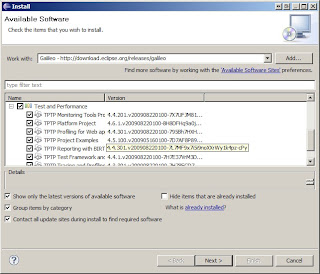
Click Next and follow the screen to install the TPTP for your Eclipse IDE.
2. Open the project which you want to profile in Eclipse.
3. Right click the main class of your Java project, and choose "Profile as>Profile "Configurations...", if you are running for the first time.


In the monitor panel of the pop out window, select "Execute Time Analysis".
Then click"Profile"
"Switch to the perspective "Profiling and Logging" if you are asked.
Here you can see the report based on your selection."
4. If you are not running the profile for the first time, choose "Java
Application" in stead.
5. After running the program will take you to the result screen.

Use TPTP in Eclipse

This is a little Tutorials about how to install TPTP in Eclipse.
What is TPTP?
Eclipse Test and Performance Tools Platform (TPTP) is a Eclipse project that contains tools for performance-testing, application profiling and testing an application.
More Information? http://www.eclipse.org/tptp/
1.Suppose you are not have TPTP ready in you Eclipse IDE.
Go to help>Install new Software...
select "Galileo - http://download.eclipse.org/releases/galileo" in the pop out window and select "Test and Performance" sub-choice. In "Test and Performance" I select all of them.

Click Next and follow the screen to install the TPTP for your Eclipse IDE.
2. Open the project which you want to profile in Eclipse.
3. Right click the main class of your Java project, and choose "Profile as>Profile "Configurations...", if you are running for the first time.


In the monitor panel of the pop out window, select "Execute Time Analysis".
Then click"Profile"
"Switch to the perspective "Profiling and Logging" if you are asked.
Here you can see the report based on your selection."
4. If you are not running the profile for the first time, choose "Java
Application" in stead.
5. After running the program will take you to the result screen.

How to use jRat in Eclipse

jrat and Eclipse


1. Donwload jrat from:http://jrat.sourceforge.net/
Extract the download file into c:\jRat
2. Open the project which you want to profile use jRat in Eclipse
in this case, I am using OysterDb1.5 as example.


3. From the drop doqn list Run>Run Configurations.....
In the field of VM arguments input the following:
-javaagent:"C:/jRat/shiftone-jrat-1-beta1/shiftone-jrat.jar"
click APPLY


4.Run your project as usual. when you run the program, you will see a whole bunch of output from the console regarding jRat, that means you run jRat successfully.

5. After finish running your project, go to the project folder: In this case should be OystrDB1.5 and you will se folder named "jrat.output". This is the folder contains the jRat outputs.
6. Run java -jar shiftone-jrat.jar from command Promt.


You will open a window "Jrat Desktop". select file>Open and then point to the "jrat.output". Open the output file and see the statistics results.

Datatable static image not found on the server

When you use ```datatables.min.css``` and ```datatables.min.js``` locally, instead of datatables CDN, you may have encountered that ```sort...