When you use ```datatables.min.css``` and ```datatables.min.js``` locally, instead of datatables CDN, you may have encountered that ```sort_desc.png```,```sort_asc.png``` and other images not found error. That's because there is no static images downloaded with ```js``` and ```css``` file.
To fix the problem, you can download these images from Datables official github and place them at your static folder on your server.
Link ```https://github.com/DataTables/DataTables/tree/master/media/images```

After put these images on the server, you may open your downloaded ```datatables.min.css``` file and update the following section:
## Original version:
```css
.sorting{background-image:url("/DataTables-1.11.5/images/sort_both.png")}
.sorting_asc{background-image:url("/DataTables-1.11.5/images/sort_asc.png")}
.sorting_desc{background-image:url("/DataTables-1.11.5/images/sort_desc.png")}
.sorting_asc_disabled{background-image:url("/DataTables-1.11.5/images/sort_asc_disabled.png")}
```
## After update:
```css
.sorting{background-image:url("/static/img/sort_both.png")}
.sorting_asc{background-image:url("/static/img/sort_asc.png")}
.sorting_desc{background-image:url("/static/img/sort_desc.png")}
.sorting_asc_disabled{background-image:url("/static/img/sort_asc_disabled.png")}
```
Datatable static image not found on the server

Join query in Django
                      Table "public.virulence_genome"
      Column      |         Type          | Collation | Nullable | Default
------------------+-----------------------+-----------+----------+---------
 genome_id        | integer               |           | not null |
 accession_number | character varying(50) |           | not null |
 strand           | integer               |           | not null |
 start_position   | integer               |           | not null |
 end_position     | integer               |           | not null |
 location         | character varying(20) |           | not null |


				Table "public.virulence_cds"
   Column    |  Type   | Collation | Nullable | Default
-------------+---------+-----------+----------+---------
 genome_id   | integer |           | not null |
 gene        | text    |           | not null |
 locus_tag   | text    |           | not null |
 note        | text    |           | not null |
 product     | text    |           | not null |
 cds_db_xref | text    |           | not null |
genome_id in virulence_cds is a foreign key of virulence_genome.
What if we want to get gene names and their locations for genes that are not located on genome?
Use sql query we could write something like:
select vc.gene,vg.location from virulence_cds vc join virulence_genome vg on vc.genome_id = vg.genome_id and vg.location !='genome';
What to do in Django view? I have propsed two ways to do it. Obvisouly one way is better than the other.
So to find all CDs which are not located at genome, we could write:
def func(request):
	genome_ids=Genome.objects.filter(location='plasmid').values_list('genome_id')
	return Cds.objects.select_related('genome').filter(~Q(genome_id__in=genome_ids))
or
def func(request):
	return Cds.objects.select_related('genome').filter(~Q(genome__location='plasmid'))
Wrap text in a datatable
How to wrap long text in jQuery Datatable, Django Datable
The solution I proposed here is that add the following code to your site/page css property.
table.dataTable tbody td {
  	word-break: break-word; word-break: break-all; white-space: normal;
}
Because in the core, datatable is a standard table. So this solution also works on any html table, as long as it has table, tbody and td structure.
Use Smart Card (PIV) as Default Login Method in Windows 10
In order to Use Smart Card (PIV) as Default Login Method in Windows 10, your account have to have system admin privilege and you have logged in using smart card before.
Go to Local group Policy Editor >> Administrative Templates >> System >> Logon
Double click "Assign a default credential provider"
In the opening window, click "enable"
Flowing instructions in this window, locate the CLSID associated with smart card login at
HKEY_LOCAL_MACHINE\SOFTWARE\Microsoft\Windows\CurrentVersion\Authentication\Credential Providers
in my case is:
{8FD7E19C-3BF7-489B-A72C-846AB3678C96}
the value is "Smartcard Credential Provider" and it has some other values as well.
Converting m4a to mp3 on CentOS
Had couple m4a files created by youtube-dl can not being played in itunes in MacOS. Used ffmpeg in CentOS to verter them to Mp3 withour any issues. Here is the command I used:
ffmpeg -i in.m4a -acodec mp3 -ac 2 -ab 320k out.mp3
For batch converting:
mkdir mp3s
for f in *.m4a; do ffmpeg -i "$f" -acodec mp3 -ac 2 -ab 320k mp3s/"${f%.m4a}.mp3"; done
ffmpeg -i in.m4a -acodec mp3 -ac 2 -ab 320k out.mp3
For batch converting:
mkdir mp3s
for f in *.m4a; do ffmpeg -i "$f" -acodec mp3 -ac 2 -ab 320k mp3s/"${f%.m4a}.mp3"; done
Oracle Apex: Editable Region in validation definition
I have been debugging why my tabular form in Apex 5.2 enters an error page http://servername/ords/wwv_floe.accept, containning
"Current tabular form data is too old; the source data has been modified.
Click here to discard your changes and reload the data from the database."
 Surprisingly, when you have a custom defined validation rule PL/SQL Function body returning boolean) mixtured with some predefined rule, like "Item is not null". Whenever, a validation fail, the system will goes to this page, and some/all user input will lost. But if all validations are defined in the same way, either all using predefined rules, or all using custom defined rules, the application will not enter this page when there is avalidation fail. The error message will only show Inline in Notification.
Conclusion:
To avoid losing user input data on a tabular form, define all the validations using same method.
"Current tabular form data is too old; the source data has been modified.
Click here to discard your changes and reload the data from the database."

Conclusion:
To avoid losing user input data on a tabular form, define all the validations using same method.
Download activity data from Garmin Forerunner 310XT on Linux
My everyday computer is running CentOS. There is no way install Garmin connect to upload data from my old 310XT. I am sure there are other ways to do so, but the following works for me.
There are two software packages need to install: openant and ant-fs.
1. Steps to install openant
git clone https://github.com/Tigge/openant
cd openant
sudo python setup.py install
2. steps to install ANT-FS
git clone https://github.com/Tigge/antfs-cli
cd antfs-cli
sudo python setup.py install
3. Pair your ant receiver with your watch
antfs-cli --pair
4. Read data from your watch
antfs-cli
The downloaded fit data from your watch is saved at
~/.config/antfs-cli/###/activities/
There are two software packages need to install: openant and ant-fs.
1. Steps to install openant
git clone https://github.com/Tigge/openant
cd openant
sudo python setup.py install
2. steps to install ANT-FS
git clone https://github.com/Tigge/antfs-cli
cd antfs-cli
sudo python setup.py install
3. Pair your ant receiver with your watch
antfs-cli --pair
4. Read data from your watch
antfs-cli
The downloaded fit data from your watch is saved at
~/.config/antfs-cli/###/activities/
Highlight Search Keyword in Oracle Apex 5
Follow the steps below:
1. Copy and paste the following JavaScript to the page "Function and Global Variable Declaration" section
http://johannburkard.de/resources/Johann/jquery.highlight-5.js
2. Add the following style sheet to the page CSS inline section:
.highlight { background-color: yellow }
3. Create interactive report, set static id: highlight_report
4. Create two dynamic actions for the interactive report region
4.1 before refresh:
Name: before refresh
Event: Before refresh
Region: is your interactive region
True Action: execute JavaScript Code
gv_search = $('#highlight_report_search_field').val()
4.2 After refresh
Name: after refresh
Event: After refresh
Region: is your interactive region
True Action: execute JavaScript Code
if (gv_search) {
$('td').highlight(gv_search);
}
Demo, go to use demo/demo and choose "Highlight Search Field"

Use IcoMoon to create Font Awesome style icon fonts and use with Apex 5
Create Font in IcoMoon
1. Go to IcoMoon online application website.
2. Click import icons to upload your own icon to the application and they are must in SVG format.

3. Once they are uploaded, click the icons you want to included into the font file. You could also choose some free icons provided by IcoMoon.

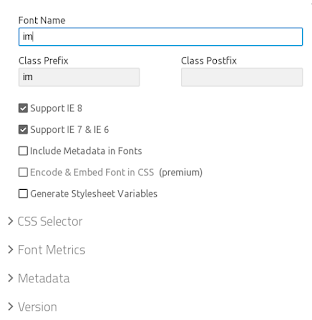
4. Click Generate Font button at bottom right, in the next page, click download.

Before downloading, you could also make some configuration adjustments by clicking Preferences.

Use Icons in Apex 5
1. Go to your apex 5 application, find "Static Applications Files" under Shared Components. Upload the downloaded zip file from IcoMoon. Choose unzip file, yes.

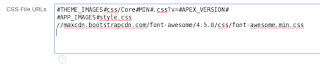
2. Look for the reference for style.css in these uploaded static files, #APP_IMAGES#style.css
in my case and copy it to: User interface >> Themes >> Universal theme (or the one you are using)>>JavaScript and Cascading Style Sheets >>CSS File URLs section
3. To use, put the class in <i> tag, for example
select '<i class="im im-pharmacy" style="color:green; font-size:40px;"></i>' display_icon, 'Pharmacy' display_word from dual;
1. Go to IcoMoon online application website.
2. Click import icons to upload your own icon to the application and they are must in SVG format.

3. Once they are uploaded, click the icons you want to included into the font file. You could also choose some free icons provided by IcoMoon.

4. Click Generate Font button at bottom right, in the next page, click download.

Before downloading, you could also make some configuration adjustments by clicking Preferences.


Use Icons in Apex 5
1. Go to your apex 5 application, find "Static Applications Files" under Shared Components. Upload the downloaded zip file from IcoMoon. Choose unzip file, yes.

2. Look for the reference for style.css in these uploaded static files, #APP_IMAGES#style.css
in my case and copy it to: User interface >> Themes >> Universal theme (or the one you are using)>>JavaScript and Cascading Style Sheets >>CSS File URLs section

3. To use, put the class in <i> tag, for example
select '<i class="im im-pharmacy" style="color:green; font-size:40px;"></i>' display_icon, 'Pharmacy' display_word from dual;
Apex 5: failed to parse SQL query in Classic Report
I tried to use Classic Report in a single row vertical display in Apex 5. When visit the page, it shows the following error:
failed to parse SQL query:
ORA-00933: SQL command not properly ended
Everything was fine about the SQL query. After checking around, I found uncheck the "sort" checkbox for every column in "Report Attributes" page will fix the error.


Can not prevent firewall from starting on CentOS?
I have disabled iptables from starting at booting time using chkconfig. Upon checking the status,
sudo chkconfig iptables --list
iptables 0:off 1:off 2:off 3:off 4:off 5:off 6:off
sudo chkconfig iptables --list
iptables 0:off 1:off 2:off 3:off 4:off 5:off 6:off
However, after rebooting the host, iptables was not disabled. What's going on?
Well, in my case, I have daemon libvirtd starts at booting time which depends on iptables, automatically creates iptables rules for each started qemu network. After disable it from start, iptables was disbaled too.
sudo chkconfig libvirtd off
if this is not the case for you, please do check the content of /etc/rc.local file, to look for any active firewall rule, such as
/sbin/iptables -I INPUT -m iprange --src-range 10.208.42.196-10.255.255.255 -j DROP
and disbable it. Some other things to look at are, init script, cron jobs.
As a quick hack until it is solved, you could run echo "service iptables stop" >> /etc/rc.local
if this is not the case for you, please do check the content of /etc/rc.local file, to look for any active firewall rule, such as
/sbin/iptables -I INPUT -m iprange --src-range 10.208.42.196-10.255.255.255 -j DROP
and disbable it. Some other things to look at are, init script, cron jobs.
As a quick hack until it is solved, you could run echo "service iptables stop" >> /etc/rc.local
Dell H310 RAID Controller
My workstation running CentOS 6.7 hangups unexpected recently every since I re-imaged it. A little improvement has been seen by adding "elevator=noop" to the boot parameter. But it does not fix the source of the problem.
I has always been suspecting the raid controller, Dell H310. First I tried updating the firmware without any improvement. To update firmware in Linux, you could use Rufus (http://rufus.akeo.ie) to create a FreeDOS bootable USB driver and put the windows version of the firmware to the USB driver.
All these fixes did not eliminate the problem from source, I wrote an email to Dell support. Finally, I got confirmed from Dell tech support that "....While the controller can do RAID 5, we in tech support really only recommend RAID 0 or RAID 1 with that controller....."
After changing to RAID 0 and running a month now, I have never encountered the hangup again.
I has always been suspecting the raid controller, Dell H310. First I tried updating the firmware without any improvement. To update firmware in Linux, you could use Rufus (http://rufus.akeo.ie) to create a FreeDOS bootable USB driver and put the windows version of the firmware to the USB driver.
All these fixes did not eliminate the problem from source, I wrote an email to Dell support. Finally, I got confirmed from Dell tech support that "....While the controller can do RAID 5, we in tech support really only recommend RAID 0 or RAID 1 with that controller....."
After changing to RAID 0 and running a month now, I have never encountered the hangup again.
Capture Sound from Sound Card in Mac OS
1. Download and install SoundFlower.
2. Configure sound output to Soundflower in Sound configuration panel of System Properties.
3. Open your sound recording software, i.e. Audacity, and choose input device is Soundflower.
4. Start recording. During the recording you will not heard sound coming from your speaker, but the sound will be captured by the software since we re-drect the sound to Soundflower
A way to install Google Chrome on CentOS 6
Download a install script, written by Richard. For more information, go to http://chrome.richardlloyd.org.uk.
wget http://chrome.richardlloyd.org.uk/install_chrome.sh
chmod u+x install_chrome.sh
sudo ./install_chrome.sh  -d -s
# -s, install stable version
# -d, delete temporary files in install successfully.
Oracle Apex APP:Change Default Page after Logging in
Change Home URL in Shared Components:
Shared Components >User Interface Attributes > Click: Desktop link or Mobile -> change value in “Home URL”
Hide Default Homepage for Tomcat
To hide default homepage for Tomcat we could redirect default homepage to other page
# Make a backup of the old homepage
cd /CATALINA_HOME/webapps/ROOT
mv index.html index.html.bak
# create a new index.html file and put the following contents in index.html file
touch index.html
vim index.html
and contents are
<head>
<meta http-equiv="refresh" content="0;URL=your_new_default_homepage">
</head>
<body>
</body>
</html>
Uncheck All Checkbox on Page Load for Apex Page Using Javascript
1. Put the following javascript function at "Function and Global Variable Declaration" of page attributes.
 2. Create page dynamics

 function UncheckAll(){
      var w = document.getElementsByTagName('input');
      for(var i = 0; i < w.length; i++){
        if(w[i].type=='checkbox'){
          w[i].checked = false;
        }
      }
  }

  Event: Page Load
  Condition: No Condition
  Action: Eecute Javascript Code
  Code: UncheckAll()
Locate and open the true event "Execute Javascript Code" of create dynamic action, check "Fire On Page Load"

Display Binary Data in Oracle Apex using Checkbox
We want to use checkbox to display a column in interactive report, which contains binary data 0 and 1.
Solution 1: Not perfect. This will cause problem in exported CSV file
In Region Source for interactive report, using CASE function to format this filed.select t1.sponsor, CASE WHEN T1.EXPERIENCE = 1 THEN 'checked=checked' END AS EXPERIENCE_CHECKBOX from sponsor t1Then add
<input type="checkbox" disabled readonly #EXPERIENCE_CHECKBOX# />to HTML Expression of EXPERIENCE_CHECKBOX column formatting.

This solution works fine by looking. However, you will notice problem in downloaded file, the content of experience column was replaced by checked="checked" and null, not original values of 0 and 1.
Solution 2: a Better solution
Use a pl/sql function to format filed content based on request type.CREATE OR REPLACE FUNCTION FORMAT_STRING (P_INT IN INT,
P_REQUEST IN VARCHAR2)
RETURN VARCHAR2
IS
V_STRING VARCHAR2 (40);
BEGIN
IF P_REQUEST NOT IN ('HTMLD', 'XLS', 'CSV') OR P_REQUEST IS NULL
THEN
IF P_INT = 1 -- or whatever value used to indicate checked
THEN
V_STRING := 'checked=checked';
END IF;
ELSE
V_STRING := P_INT;
END IF;
RETURN V_STRING;
EXCEPTION
WHEN OTHERS
THEN
RAISE;
END FORMAT_STRING;
In Region Source for interactive report, use FORMAT_STRING function to format experience field.
select t1.sponsor, format_string(T1.experience, :request) EXPERIENCE_CHECKBOX from sponsor t1Also add
<input type="checkbox" disabled readonly #EXPERIENCE_CHECKBOX# />to HTML Expression of EXPERIENCE_CHECKBOX column formatting.
Final Product

Hide/Show Long Column Content in Oracle Apex Report
I used the following method to hide the extra long column contents when loading the page. The contents will then display when mouse hover the content.
Figure 1: Before applying CSS

Figure 2: After applying CSS

1. In the column attributes page, column Formatting section, add the following to HTML Expression text area for the column to modify:
2. Add the following style sheet to the report page Inline CSS property (replace "COLUMN_NAME" accordingly):
Figure 1: Before applying CSS
Figure 2: After applying CSS
1. In the column attributes page, column Formatting section, add the following to HTML Expression text area for the column to modify:
<div>#COLUMN_NAME#</div>COLUMN_NAME is the name of the column to which you want to apply these css property.
2. Add the following style sheet to the report page Inline CSS property (replace "COLUMN_NAME" accordingly):
td[headers="COLUMN_NAME"] div {
          width: 15EM;
          white-SPACE: nowrap;
          OVERFLOW: hidden;
          text-OVERFLOW: ellipsis;
}

td[headers="COLUMN_NAME"] div:hover {
      width: 15EM;
      white-SPACE: NORMAL;
      OVERFLOW: VISIBLE;
}
Subscribe to:
Posts (Atom)